NDK RAM 使用分析及优化指南
1 如何查看KEIL的RAM和Flash使用情况
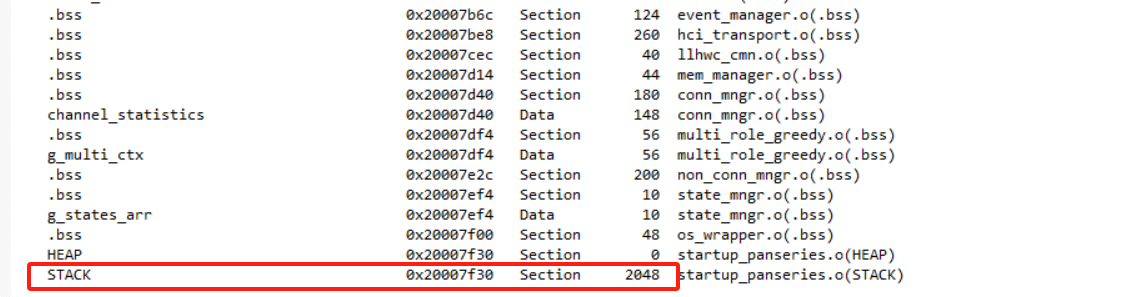
因为当前工程中很多和BLE事件处理相关的函数为了提升处理速度使用了RAM CODE,所以导致部分CODE会占用RAM空间,所以查看工程的实际占用空间要从RAM和Flash空间进行查看。
首先双击keil项目打开map文件

2 关于堆空间的使用说明
2.1 蓝牙controller的堆
蓝牙controller使用的内存不需要用户手动配置,软件会自动计算。但是sdk_config.h文件中的一些配置会影响蓝牙controller内存使用量,这些配置如下:
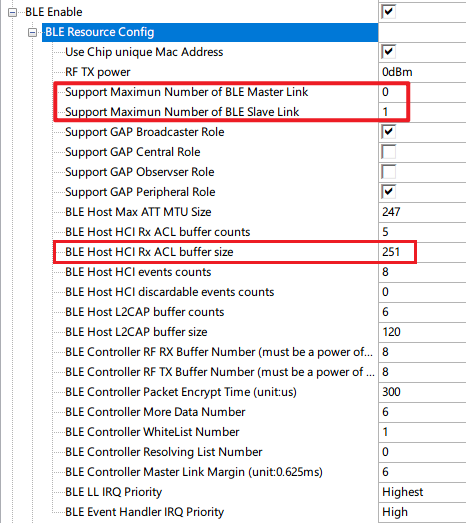
应用controller 内存消耗的配置项
2.2 App以及host使用的堆(应用层堆全局使用freertos的堆)
为了方便资源管理,我们app和host全局使用freertos的堆,相应堆的分配函数pvPortMalloc。
当前SDK哪些资源默认使用了freertos的堆呢?
app中显式使用
pvPortMalloc的地方freertos task的栈
创建freertos定时器时的栈(定时器也是task)、
freertos创建信号量等
2.3 如何查看freertos heap的使用
我们可以通过打开sdk_config.h中的OS Log:Print Current Heap Usage选项(对应的宏CONFIG_FREERTOS_HEAP_PRINT)来开启heap消耗log信息。
freertos heap的宏是FreeRTOSConfig.h中的configTOTAL_HEAP_SIZE,我们可以通过修改configTOTAL_HEAP_SIZE的值来改变全局堆的大小。
启动时会输出如下:
[19:47:57.875]收←◆total allocated bytes:216,remain:5920
total allocated bytes:304,remain:5832
total allocated bytes:392,remain:5744
total allocated bytes:480,remain:5656
total allocated bytes:536,remain:5600
total allocated bytes:704,remain:5432
total allocated bytes:792,remain:5344
LL Controller Version:bd5923c

[19:47:57.918]收←◆app started
total allocated bytes:848,remain:5288
total allocated bytes:2864,remain:3272
total allocated bytes:2960,remain:3176
total allocated bytes:3232,remain:2904
total allocated bytes:3328,remain:2808
total allocated bytes:4368,remain:1768
total allocated bytes:4464,remain:1672
total allocated bytes:4520,remain:1616
total allocated bytes:4752,remain:1384
total allocated bytes:4776,remain:1360
total allocated bytes:4808,remain:1328
我们故意将configTOTAL_HEAP_SIZE设置为一个很小的值,分配失败是会有如下显示:
[19:50:28.736]收←◆total allocated bytes:216,remain:2848
total allocated bytes:304,remain:2760
total allocated bytes:392,remain:2672
total allocated bytes:480,remain:2584
total allocated bytes:536,remain:2528
total allocated bytes:704,remain:2360
total allocated bytes:792,remain:2272
LL Controller Version:bd5923c

[19:50:28.778]收←◆app started
total allocated bytes:848,remain:2216
total allocated bytes:2864,remain:200
total allocated bytes:2960,remain:104
pvPortMalloc failed
allocate 272 bytes failed,remain:104
另外我们也要注意一点,堆定义的空间可以适当多分配一点,有些堆的分配是在运行时才会去调用。